Day 58 : Ansible Playbooks
DevOps Learning

Ansible Playbooks
What Are Ansible Playbooks?
Definition: Ansible Playbooks are YAML files that define a series of tasks to be executed on remote servers. They are designed to be human-readable and describe the automation tasks in plain language.
Purpose: Playbooks automate complex IT tasks such as configuration management, application deployment, and continuous delivery.
Structure of Ansible Playbooks:
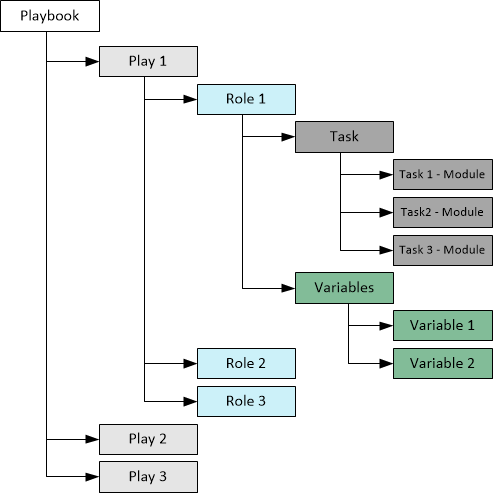
Plays: A Playbook can contain multiple plays. Each play targets a group of hosts (servers) and executes tasks on them.
Tasks: These are the actions that Ansible performs on the hosts. Each task calls an Ansible module, such as
yum,service, orcopy.Modules: Reusable, standalone scripts that can be used by tasks. Ansible comes with hundreds of modules to handle various automation tasks.
Handlers: Special tasks that run only when triggered by other tasks. They are typically used to restart services when a configuration file changes.
Basic Components of a Playbook:
- name: Example Playbook
  hosts: webservers
  become: true  #Runs tasks with elevated privileges
  tasks:
    - name: Apache is installed
      yum:
        name: httpd
        state: present

    - name: Start Apache service
      service:
        name: httpd
        state: started
name:: Describes what the playbook or task does.hosts:: Specifies the target hosts or groups of hosts.become:: (Optional) Allows tasks to be run with elevated privileges.tasks:: Lists the tasks to be executed.
Advanced Playbook Features:
Variables: Used to store values that can be reused throughout the playbook.
Loops: Allow tasks to be repeated for multiple items.
Conditionals: Execute tasks only when certain conditions are met.
Roles: A way to organize playbooks into reusable components, including tasks, variables, files, templates, and handlers.
Example of a Complex Playbook with Variables and Loops:
- name: Install Multiple Packages
  hosts: all
  vars:
    packages:
      - git
      - vim
      - curl
  tasks:
    - name: Ensure packages are installed
      yum:
        name: "{{ item }}"
        state: present
      loop: "{{ packages }}"
vars:: Defines variables.loop:: Iterates over a list of items.
Benefits of Using Ansible Playbooks:
Simplicity: Written in YAML, which is easy to read and write.
Idempotence: Ensures that changes are made only when necessary, avoiding repeated actions.
Flexibility: Can manage different environments (development, staging, production) with the same playbook.
Consistency: Ensures that all systems are configured uniformly.
Use Cases for Ansible Playbooks:
Configuration Management: Ensuring systems are set up correctly and remain in the desired state.
Application Deployment: Automating the deployment process across multiple servers.
Orchestration: Coordinating complex multi-machine deployments and workflows.
Provisioning: Setting up virtual machines, containers, and cloud resources.
Ansible Playbooks are the backbone of Ansible automation. They enable you to define the desired state of your infrastructure and applications in a simple, human-readable format. Whether you're managing a few servers or thousands, Playbooks help ensure everything runs smoothly and consistently.
Thank you for reading😉.


